NASA
- 4.3
- Rating
- 10.00M
- Installs
- Free
- Price
 Analysis by App-foxy
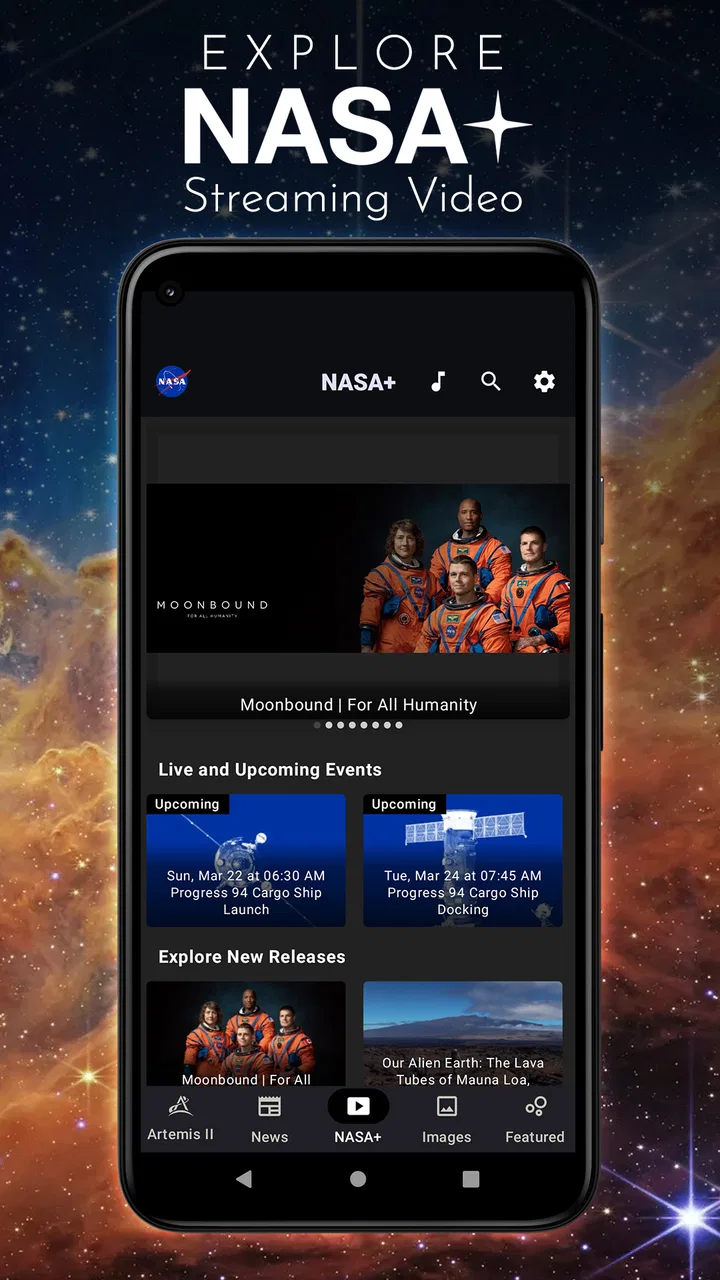
I installed NASA expecting a simple way to browse space news, but I found something more useful: a compact education app that turns NASA’s work into a steady stream of images, stories, mission updates, and reference material. It is the official NASA app for Android, developed by NASA, and it is free to use. That last point matters because the app’s value is not tied to a trial period or an upgrade screen; you can explore it without paying before deciding whether it deserves a permanent place on your phone.
My overall impression is that NASA works best as a gateway to curiosity rather than as a complete astronomy course. It can help you understand what NASA is doing, give you material to explore when you have a few spare minutes, and make space science feel present in everyday life. It is less suitable if you want a structured sequence of lessons, detailed tutoring, or a replacement for a dedicated astronomy reference tool.
How NASA feels to use as an education app
The first thing I noticed is the difference between opening this app for a quick look and using it deliberately. A casual visit can be as short as checking a new image or reading a mission-related story. A more focused session can lead from one subject to another: a planet, a spacecraft, an observation, or a broader explanation of NASA’s work. That flexibility is one of its strongest qualities, but it also means you need to create your own path.
You May Also Like

 Blood Strike: 2.5 Anniversary
Blood Strike’s Loadouts Turn Every Drop Into a Tactical Gamble
A close look at Blood Strike’s custom loadouts: how fast access to signature weapons reshapes its battle royale rhythm, rewards preparation, and narrows the gap between fights.

 Pandora - Music & Podcasts
Pandora’s Music Is Easy to Start, but Harder to Recover
Pandora’s strength is its low-effort path from a seed to a station. Its weak spot is how much confidence it asks you to place in connection, setup, and quiet recovery.

 8 Ball Pool
 Is Built on Rivalries, Rematches, and Routine
A close look at the rivalries, rematches, shared routines, and unanswered safety questions that turn a quick pool match into a persistent mobile community.

 Samsung Music
’s Quiet Strength Is Playing What You Already Own
Its reach comes less from spectacle than from dependable access to a personal library. That simplicity is both the app’s strongest retention engine and its ceiling.

 AccuWeather: Weather Radar
AccuWeather Review: A Quick, Clear Forecast for Everyday Decisions
For everyday plans, the best forecast is the one you can understand quickly. AccuWeather makes rain timing, radar, and local conditions easy to act on, with a few trade-offs.

 Hill Climb Racing
Why Hill Climb Racing Still Turns Crashes Into One More Run
A tiny car, a bumpy hill and one more upgrade: Hill Climb Racing keeps resurfacing because its simple chaos makes every near-miss feel personal.
More From Our News Desk
View All News


Unlike a lesson-based learning app, NASA does not make me feel as though I am moving through a fixed syllabus. There is no pressure to complete a chapter before continuing, and that makes it friendly for beginners. At the same time, someone studying for an exam may find the experience too open-ended. I can learn something interesting in ten minutes, but I may need another source to organize that knowledge into definitions, exercises, and revision notes.
The app’s subject matter gives it a distinct advantage over general news apps. Space coverage is often scattered across headlines, social posts, videos, and specialist websites. NASA brings the subject closer to one place, which makes it easier to stay with a topic instead of repeatedly searching for it. I found that especially helpful when I wanted context around a mission rather than a single dramatic picture.
There is also a useful difference between browsing for entertainment and browsing with a question in mind. If I open the app simply to see what is new, I can enjoy the discovery aspect. If I begin with a question such as why a mission matters or what an image is showing, I get more educational value from the same material. My advice is to use it with a small question ready; that turns passive scrolling into a more active learning habit.
What makes the free access worthwhile
NASA is available at no cost, so the decision is not whether the app is worth a subscription. The real question is whether its free access gives you enough useful material to justify installing it. In my experience, it does for anyone who already enjoys space, science, photography, or current exploration. The app offers a convenient starting point without asking you to commit money before you know how often you will use it.
That free model also makes it practical for families and classrooms. A parent can open it with a child and follow a question wherever it leads. A teacher can use an image or mission story as the beginning of a discussion, then move to a separate activity or textbook. A student can use it for inspiration when choosing a presentation topic. The app does not have to carry the entire lesson to be useful; it can supply the spark that gets the lesson moving.
I would be careful, however, about treating free access as a promise of a complete educational package. The absence of a price does not automatically make an app a full course. NASA gives me access to authoritative subject matter and an engaging browsing experience, but I still need outside tools when I want practice questions, formal progression, or a carefully measured learning plan.
Its public reputation supports that first impression. NASA has an average rating of 4.3 from around 118 thousand ratings, with about 4.6 thousand written reviews, and it has passed 10 million installs. Those figures suggest that it has reached a broad audience, but they do not tell me whether every user will enjoy the same style of learning. I would read the popularity as reassurance that the app is established, not as proof that it replaces every alternative.
Where the educational value really appears
The strongest value comes from combining visual appeal with real-world context. Space subjects can feel abstract when they are reduced to vocabulary lists. Seeing an image connected to a mission or a scientific theme gives the information a memorable anchor. I often remember the question raised by an image before I remember the technical explanation, and that is still a productive starting point.
One practical workflow is to use the app as a three-step research companion. First, browse until a subject catches your attention. Second, write down the specific terms or names that appear in the material. Third, research those terms separately and return to the app to see whether the original story makes more sense. This avoids a common problem with science browsing: collecting impressive facts without understanding how they relate.
Another useful approach is to treat the app as a prompt generator for children. Instead of handing over the phone and expecting a child to absorb everything, I would ask them to choose one image or story and explain what they think is happening. Then I would look up the unfamiliar words with them. This makes the app more interactive and reduces the chance that the experience becomes a quick sequence of pictures with no lasting understanding.
For adults, the value may be less about formal education and more about maintaining a connection with science. I like that it can fit into a short break without requiring a long study session. A person who has always wanted to learn more about astronomy but never found time for a course can use it as a low-pressure first step. The important limitation is that curiosity will need to come from the user; the app can open doors, but it does not force a routine.
Everyday scenarios where it fits well
Imagine a family waiting for an appointment. One person opens NASA, finds an image or story, and asks a child what they notice first. The conversation can move naturally toward planets, spacecraft, distance, or the work behind the image. That is a better use than simply passing the phone around, because the app becomes a shared object of discussion rather than a private feed.
It also works well for a student who needs to choose a science project. I would not copy a topic directly from the app and stop there. Instead, I would use it to identify a question with enough depth to investigate. For example, a student could begin with a mission story, list the scientific ideas involved, and then decide whether to focus on engineering, observation, planetary science, or the human side of exploration. The app is valuable at the discovery stage, while books and classroom resources can provide the structure afterward.
For someone who enjoys photography, NASA can offer a different reason to return. The images are not merely decorative; they can lead to questions about scale, instruments, light, surfaces, and the conditions in which the image was made. I found that looking carefully at an image before reading its explanation made the later information easier to remember. This is a small habit, but it turns visual browsing into observation practice.
The tradeoffs I noticed during regular use
The biggest tradeoff is freedom versus structure. NASA gives me room to follow my interests, which feels natural and welcoming. The same freedom can make the app feel less satisfying when I want a clearly ordered learning path. If you learn best through levels, quizzes, repetition, and visible progress, a dedicated course app will probably serve you better.
Another tradeoff is breadth versus depth. NASA can introduce many subjects, but an introduction is not the same as a complete explanation. A short piece may answer the immediate question while leaving technical details for further reading. I see this as a strength for general audiences, but a limitation for advanced learners who want equations, detailed methodology, or a long-form treatment of one subject.
The browsing style can also encourage shallow consumption if I am not careful. Beautiful images and short updates are easy to move through quickly. My solution is to pause on fewer items and keep a note of what I want to investigate later. Without that habit, I may finish a session feeling entertained but unable to explain what I learned.
There is a further distinction between official subject matter and personal guidance. NASA gives the app a strong sense of authority, but it does not know my current level, correct my misunderstandings, or adapt a lesson to my weaknesses. A teacher, tutor, or interactive course can respond to those needs more directly. I would use NASA alongside those resources, not assume that official content alone creates a personalized education experience.
Who should install it, and who should look elsewhere
I recommend NASA to curious beginners, families, teachers looking for discussion material, students searching for project ideas, and adults who want a reliable way to keep space science in their routine. It is also a good fit for anyone who prefers learning through images and real examples rather than starting with a textbook. Since it is free and rated for Everyone, the barrier to trying it is low, although younger children will still benefit from an adult explaining unfamiliar ideas.
I would be more cautious if your main goal is exam preparation. The app can help you discover topics and make them memorable, but it is not the tool I would choose as my only study resource. I would also skip it if you want a tightly guided astronomy curriculum, frequent testing, personal feedback, or a specialized technical database. In those situations, a structured education platform or reference work is the better choice.
It may also be a poor match for someone who wants only quick entertainment. The space subject can be visually exciting, but the app’s educational value increases when you read, question, and follow up. If you prefer a purely passive stream, you may enjoy the images while missing the deeper benefit. That is not a defect so much as a reminder that the app rewards attention more than speed.
Small habits that make the app more useful
I recommend choosing one theme for a week instead of opening the app without a purpose every time. A theme might be a type of mission, a planet, an image technique, or the engineering problem behind a spacecraft. Each visit then adds another piece to the same mental picture. This is more effective than trying to remember unrelated facts from many different subjects.
Another tip is to explain one item aloud after reading it. If I cannot describe the main idea in ordinary language, I probably need to read it again or investigate a term. This simple test reveals the difference between recognizing a headline and actually understanding it. It works particularly well with children, because their questions often expose the exact point that needs explanation.
I also suggest separating “interesting” from “useful for my project.” An image may inspire a presentation, but the final project still needs a focused question and supporting research. NASA is excellent for finding that starting point. It is less convenient as the only place to collect every source, definition, and citation needed for finished academic work.
Finally, use the app when you have enough time to follow one idea, even if that is only a few minutes. The best sessions I had were not necessarily the longest; they were the ones where I stopped scrolling and pursued one question. That approach makes the free access feel more valuable because I am using the app as a learning tool rather than merely checking a feed.
My recommendation after testing it
NASA is a strong free starting point for space education, but not a complete replacement for structured learning. I like its ability to make NASA’s work approachable, its usefulness for visual discovery, and the way it can turn an idle moment into a science conversation. The official connection to NASA gives the experience a clear identity, while the broad audience and more than 10 million installs show that it is not a niche experiment.
My verdict is to install it if you want accessible space content, family discussion material, or a source of ideas for deeper research. You do not need to buy anything to find out whether it fits your habits, which makes trying it an easy decision. I would skip it only when your priority is a formal course, advanced technical depth, or personalized instruction. For everyone else, NASA earns its place as a thoughtful companion for staying curious about space.
FAQs for NASA
01What features does the NASA app offer?
The NASA app provides a rich array of features including access to the latest news, images, and videos from NASA missions. Users can explore live streams from the International Space Station, view 3D models of spacecraft, and receive real-time notifications of mission updates. The app also includes educational resources and information about upcoming events and launches.
02Is the NASA app free to download and use?
Yes, the NASA app is completely free to download and use on both Android and iOS platforms. There are no hidden fees or in-app purchases required to access any of the features. This makes it an excellent resource for students, educators, and anyone interested in space exploration without any cost barriers.
03Does the NASA app require an internet connection?
While the NASA app offers a wealth of offline content, such as pre-downloaded articles and images, many features do require an internet connection. Live streams, real-time notifications, and the latest news updates are dependent on internet access. It's recommended to have a stable connection to fully enjoy all the functionalities.
04Can children use the NASA app safely?
The NASA app is designed to be family-friendly and is suitable for users of all ages. It contains educational content that can be beneficial for children. However, parents should guide younger users, especially during live streams or when accessing external links, to ensure a safe and educational experience.
05How often is the content on the NASA app updated?
The NASA app is frequently updated with the latest information, reflecting real-time developments in space exploration. News articles and mission details are updated as soon as new information becomes available, ensuring users have access to the most current data. Regular updates are also applied to improve user experience and fix any potential bugs.
Pros
- Stunning space imagery collection.
- Real-time NASA mission updates.
- Educational resources for all ages.
- User-friendly interface and navigation.
- Free access to a wealth of information.
Cons
- Requires internet for full functionality.
- No offline content available.
- Occasional app crashes reported.
- Limited interactive features.
- Some content is not frequently updated.

NASA
Gallery